DALL-E 3 Review 2026: Is It Still Worth Using?
Quick Answer:
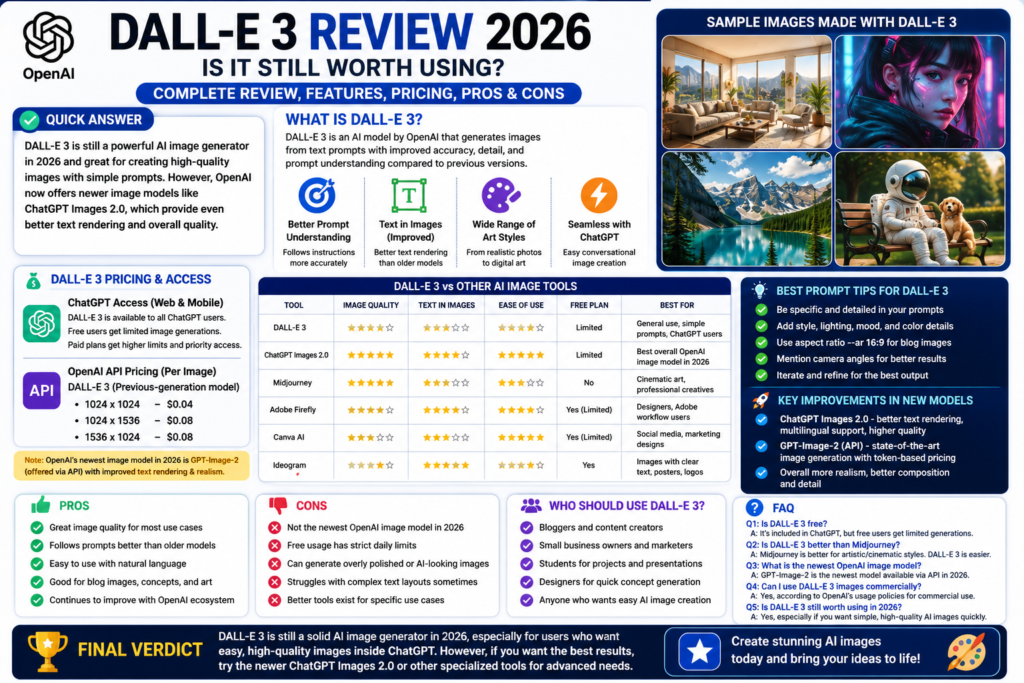
DALL-E 3 is still worth knowing in 2026, but it is no longer OpenAI’s newest image model. For most everyday users, ChatGPT’s newer image generation tools are the better choice, while DALL-E 3 still matters for people comparing AI image quality, API pricing, and older OpenAI image workflows.
DALL-E 3 Review 2026: What Is DALL-E 3?
This dalle 3 review 2026 needs to start with one honest point.
DALL-E 3 is still famous, but the AI image world has moved fast.
When DALL-E 3 launched, it was one of the biggest upgrades in AI image generation. It was much better than DALL-E 2 at following prompts, understanding details, and creating usable images from normal language. OpenAI described DALL-E 3 as a major step forward because it followed user prompts more closely and reduced the need for advanced prompt engineering.
Here is the thing. In 2026, OpenAI has newer image generation technology inside ChatGPT. OpenAI introduced ChatGPT Images 2.0 in April 2026 with improved text rendering, multilingual support, better instruction following, and more advanced visual output.
So, is DALL-E 3 still worth using?
Honestly, yes and no.
Yes, because it is still an important AI image generator and many people still search for it.
No, because if you are using ChatGPT today, you may already be using newer OpenAI image tools instead of classic DALL-E 3.
What Does DALL-E 3 Do?
DALL-E 3 creates images from text prompts.
You describe what you want, and the model generates an image. You can ask for styles like realistic photography, digital art, 3D render, watercolor, poster design, cartoon, product mockup, and more.
You can use it for:
- Blog feature images
- Social media graphics
- AI art
- Product concepts
- Website visuals
- Marketing ideas
- YouTube thumbnails
- Poster concepts
- Story illustrations
In my experience, DALL-E 3 is best when your prompt is clear but not too complicated.
Who Created DALL-E 3?
DALL-E 3 was created by OpenAI.
OpenAI also makes ChatGPT, and that is why most normal users think of DALL-E 3 as part of ChatGPT image generation.
The naming can be confusing now.
People still say “DALL-E” when they mean “ChatGPT image generation.” But technically, OpenAI’s current image lineup includes newer models too. OpenAI’s API pricing page now lists GPT-Image-2 as a state-of-the-art image generation model.
That is important for a 2026 review.
Best DALL-E 3 Features
DALL-E 3 became popular because it fixed many problems older AI image tools had.
It was easier to use. It understood prompts better. It produced cleaner results. And it worked naturally inside ChatGPT.
Strong Prompt Understanding
DALL-E 3’s biggest strength was prompt following.
Older AI image generators often ignored important parts of a prompt. You would ask for five details, and the tool would follow maybe two.
DALL-E 3 improved that.
OpenAI said DALL-E 3 was better at creating images that follow the text you provide, even compared with DALL-E 2 using the same prompt.
That made it easier for beginners.
You did not need to learn strange prompt formulas. You could write naturally.
For example:
“Create a clean blog feature image showing a laptop, AI art tools, and a modern creative workspace.”
That type of prompt works better than it did with older tools.
Easy ChatGPT Workflow
This is the best part for normal users.
You don’t need a separate design app. You can ask ChatGPT to help create the image idea, improve the prompt, generate the image, and then revise it.
That conversational workflow is very useful.
For example, you can say:
- “Make it more simple.”
- “Remove the extra text.”
- “Make it look less AI-generated.”
- “Use a cleaner blog feature image style.”
- “Make it suitable for a USA audience.”
Honestly, this is where OpenAI’s image tools feel easier than many competitors.
You can talk through the image like you are working with a designer.
Good for Blog and Content Images
DALL-E 3 is useful for content creators.
If you run a blog, YouTube channel, newsletter, or social media page, you can create visual ideas quickly.
It works well for:
- AI blog thumbnails
- Featured images
- Concept graphics
- Social posts
- Educational visuals
- Simple illustrations
- Marketing graphics
The good news is that you don’t need design skills.
The bad news is that AI images can still look too polished or artificial if you do not guide the style carefully.
So I always recommend asking for simple, clean, human-made-looking designs.
DALL-E 3 Pricing and Access in 2026
Pricing is where things get a little confusing.
That is because DALL-E 3 can be discussed in two ways.
One is as part of ChatGPT image generation.
The other is through OpenAI’s API.
Is DALL-E 3 Free?
DALL-E 3 became available to all ChatGPT users, according to OpenAI’s DALL-E 3 page.
But free access usually has limits.
OpenAI’s current ChatGPT pricing page says the free plan has limited image generation, while paid plans give broader access to image generation and other tools.
So yes, you may be able to generate images without paying.
But if you create images often, you will probably feel the limits.
DALL-E 3 API Pricing
For developers, DALL-E 3 is still listed in OpenAI’s API model docs as a previous-generation image generation model.
The OpenAI API docs list DALL-E 3 as supporting image generation from text, with sizes like 1024×1024, 1024×1536, and 1536×1024, and prices shown as $0.04, $0.08, and $0.08 depending on size.
That matters if you are building apps or tools.
For bloggers and casual users, API pricing probably does not matter.
For developers, startups, SaaS builders, and automation tools, it does.
Newer OpenAI Image Models
This is the part many people miss.
In 2026, DALL-E 3 is not the newest OpenAI image model.
OpenAI’s API pricing page lists GPT-Image-2 as a state-of-the-art image generation model, with token-based pricing for image and text inputs.
OpenAI also introduced ChatGPT Images 2.0 in April 2026, focused on better text rendering, multilingual output, and more practical image generation.
So if you ask, “Should I use DALL-E 3 today?” the better question is:
Are you using DALL-E 3 specifically, or are you using OpenAI’s newer ChatGPT image generation?
For most users, newer ChatGPT image generation is the better option.
DALL-E 3 Image Quality: Is It Still Good?
DALL-E 3 image quality is still good.
But it depends on what you compare it with.
Best for Simple, Clear Visuals
DALL-E 3 is good for clean, direct image prompts.
It can create illustrations, concept visuals, marketing-style images, and creative art.
It is especially useful when you want:
- Simple blog images
- Friendly illustrations
- Clean digital art
- Basic product concepts
- Educational graphics
- Social media visuals
In my experience, DALL-E 3 is easier for beginners than Midjourney.
Midjourney often creates more cinematic images. But DALL-E 3 feels easier if you want to describe something naturally and get a usable result.
Text in Images
DALL-E 3 improved text handling compared with many older AI image tools.
But in 2026, newer tools may do better.
OpenAI specifically promoted improved text rendering in ChatGPT Images 2.0, which suggests newer ChatGPT image tools are stronger for designs with readable text.
So if your image needs text, like a poster, infographic, thumbnail, or ad design, I would test the newer ChatGPT image tools first.
You can also test Ideogram because it is known for text-heavy AI images.
Realism and Style
DALL-E 3 can create realistic images, but it may not always have the same cinematic depth as Midjourney.
Midjourney still feels better for dramatic AI art, fantasy scenes, fashion-style visuals, and highly stylized images.
DALL-E 3 is better for people who want simple prompting and clean results.
So the choice depends on your goal.
If you want beautiful art, try Midjourney.
If you want easy image creation inside ChatGPT, OpenAI image generation is very convenient.
DALL-E 3 Comparison Table
| Tool |
Best For |
Free Access |
Image Quality |
Main Weakness |
| DALL-E 3 |
Simple AI images and prompt-based visuals |
Limited through ChatGPT |
Good |
Previous-generation model |
| ChatGPT Images 2.0 |
Newer OpenAI image generation |
Limited / paid access varies |
Very strong |
Usage limits |
| Midjourney |
Cinematic AI art |
No main free trial |
Excellent |
Paid and less beginner-friendly |
| Adobe Firefly |
Professional creative work |
Yes, limited |
Strong |
Best inside Adobe tools |
| Canva AI |
Social media designs |
Yes, limited |
Good |
Less artistic control |
| Ideogram |
Text inside images |
Yes |
Strong for text |
Free limits |
| Leonardo AI |
Creative control and concept art |
Yes |
Strong |
Can feel complex |
The truth is, DALL-E 3 is still useful.
But it is not the only OpenAI image tool people should think about in 2026.
Pros and Cons of DALL-E 3
Pros
DALL-E 3 has some clear strengths.
- Easy to use: You can write normal prompts.
- Good prompt following: It understands clear instructions well.
- Useful inside ChatGPT: The workflow is beginner-friendly.
- Good for blog images: It can create simple feature images and graphics.
- Better than older DALL-E versions: It improved detail and prompt accuracy.
- Developer access exists: OpenAI’s API docs still list DALL-E 3 as an available model.
- Good for fast ideas: You can quickly test visual concepts.
Honestly, DALL-E 3’s best feature is simplicity.
You describe the image, and it tries to follow the request.
Cons
DALL-E 3 also has real downsides.
- Not OpenAI’s newest image model: Newer ChatGPT image tools now exist.
- Can look too AI-generated: Some outputs may feel overly polished.
- Not always best for cinematic art: Midjourney can look more premium.
- Free access has limits: Heavy users may need a paid plan.
- Text-heavy images may be better with newer models: ChatGPT Images 2.0 specifically improves text rendering.
- API users may prefer newer models: OpenAI now lists GPT-Image-2 as a state-of-the-art image model.
Here is the thing.
DALL-E 3 is not bad.
It is just no longer the newest name in OpenAI image generation.
Who Should Use DALL-E 3?
DALL-E 3 is still useful for many people, especially if they are already inside ChatGPT.
Bloggers and Content Creators
Bloggers can use DALL-E 3-style image generation for:
- Blog feature images
- Article graphics
- Concept visuals
- AI tool thumbnails
- Pinterest pins
- Simple social media images
If you run a site like AI Daily Tool, OpenAI image generation can save time.
You can create visuals for tool reviews, comparison posts, beginner guides, and listicles.
My advice is to keep designs simple. Too much text inside the image can become messy.
Small Business Owners
Small business owners can use it for marketing ideas.
For example:
- Product concept visuals
- Website graphics
- Social media posts
- Ad ideas
- Seasonal campaign images
- Simple illustrations
You should still use a designer for serious branding.
But for ideas and quick content, AI images are useful.
Developers and App Builders
Developers may still care about DALL-E 3 because it is listed in OpenAI’s API docs.
If you are building an app that creates images from prompts, DALL-E 3 may still be an option. But you should also compare it with newer OpenAI image models and pricing. OpenAI’s current API pricing page lists GPT-Image-2 and other newer image models with token-based pricing.
So developers should not choose DALL-E 3 automatically.
Compare output quality, cost, speed, and model availability first.
FAQ
Is DALL-E 3 worth it in 2026?
Yes, DALL-E 3 is still worth using for simple image generation, blog visuals, and prompt-based creative ideas. But for the best OpenAI image experience in 2026, newer ChatGPT image tools may be better.
Is DALL-E 3 free?
DALL-E 3 became available to all ChatGPT users, but free image generation has limits. Paid ChatGPT plans generally provide broader image generation access.
Is DALL-E 3 better than Midjourney?
DALL-E 3 is easier for beginners and works well inside ChatGPT. Midjourney is usually better for cinematic AI art, detailed fantasy visuals, and premium artistic styles.
Is DALL-E 3 the newest OpenAI image model?
No. OpenAI’s current API pricing page lists GPT-Image-2 as a state-of-the-art image generation model, while DALL-E 3 is listed in the API docs as a previous-generation image generation model.
Can DALL-E 3 create text inside images?
DALL-E 3 improved text handling compared with older tools, but newer ChatGPT Images 2.0 is specifically promoted with improved text rendering and multilingual support.
Final Verdict: Is DALL-E 3 Still Worth Using?
So, what is my honest take after this dalle 3 review 2026?
DALL-E 3 is still useful, but it is no longer the most exciting OpenAI image tool.
It was a big step forward when it launched. It made AI image generation easier, cleaner, and more beginner-friendly. It still matters for people comparing image tools, using older workflows, or checking API options.
But if you are a normal user today, I would focus more on ChatGPT’s newer image generation tools.
Use DALL-E 3 if you want simple OpenAI image generation and you already know the workflow.
Use ChatGPT Images 2.0 or newer OpenAI image models if you want better text rendering, stronger instruction following, and more modern image output.
Use Midjourney if you want premium cinematic art.
Use Canva AI if you want social media designs.
Use Adobe Firefly if you work inside Adobe tools.
The best choice depends on what you create.
For more practical AI reviews like this dalle 3 review 2026, keep reading AI Daily Tool for honest comparisons, beginner guides, and real-world AI tool recommendations.
Leave a Comment