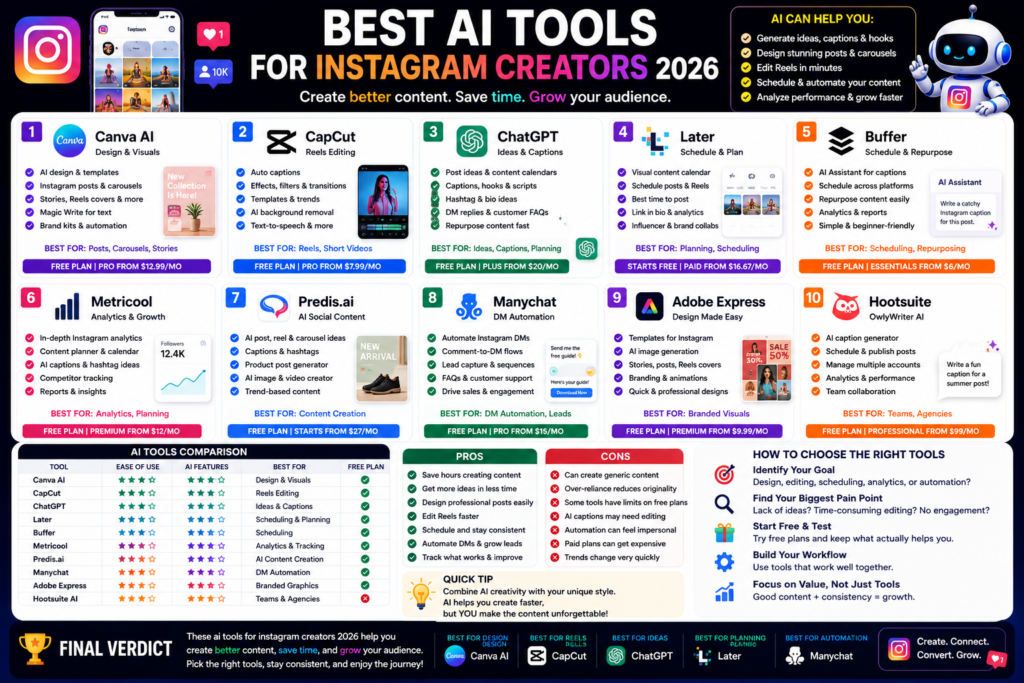
Best AI Tools for Instagram Creators 2026
Best AI Tools for Instagram Creators 2026: Create Better Posts, Reels, and Carousels Faster Quick Answer:...
Quick Answer:
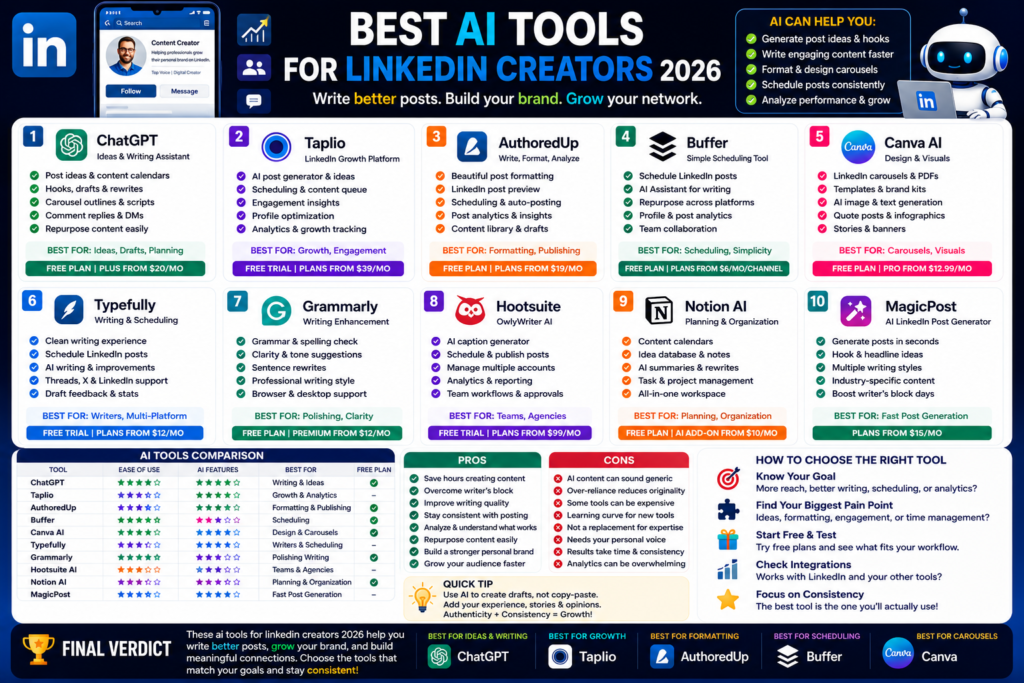
The best ai tools for linkedin creators 2026 are ChatGPT, Taplio, AuthoredUp, Buffer, Canva AI, Typefully, Grammarly, Hootsuite OwlyWriter AI, Notion AI, and MagicPost. ChatGPT is best for ideas and drafts, Taplio is best for LinkedIn growth, AuthoredUp is best for formatting, Buffer is best for scheduling, and Canva is best for LinkedIn carousels.
The best ai tools for linkedin creators 2026 can help you write better posts, stay consistent, and grow your professional brand faster.
And honestly, LinkedIn is not easy anymore.
You need strong ideas, clear writing, good hooks, useful carousels, consistent posting, comments, replies, analytics, and a personal brand that feels real.
That is a lot.
AI tools can help with the boring parts.
They can help you brainstorm post ideas, rewrite weak drafts, create hooks, plan content calendars, format LinkedIn posts, schedule posts, design carousels, analyze performance, and repurpose content from blogs, podcasts, newsletters, or videos.
Here is the thing.
AI will not build your authority by itself.
LinkedIn works best when your content has real experience, honest opinions, clear lessons, and useful ideas. If your posts sound generic, people will ignore them.
But AI can help you create faster.
And when you create faster, you can test more ideas, learn what works, and improve your voice.
That is where AI becomes useful.
Not every AI tool is good for LinkedIn.
Some tools are better for TikTok. Some are better for Instagram. Some are better for blog writing. LinkedIn needs a different style.
LinkedIn content is usually professional, thoughtful, educational, personal, or business-focused.
A good LinkedIn AI tool should help you write better posts.
That means:
LinkedIn posts should be easy to skim.
People scroll fast.
If your first line is weak, they move on.
AI can help you test multiple hooks before publishing.
Consistency matters on LinkedIn.
You do not need to post five times a day.
But you do need to show up regularly if you want people to remember you.
AI tools can help with:
In my experience, most creators do not fail because they lack ideas.
They fail because they do not have a system.
AI helps you build that system.
This is very important.
LinkedIn is full of generic AI posts now.
You can spot them quickly.
They sound polished, but empty.
A good AI workflow should keep your real voice.
Use AI to organize your ideas, not replace your personality.
Add your own stories, client lessons, mistakes, results, screenshots, examples, and opinions.
That is what makes people trust you.
Here are the best tools I would actually consider for LinkedIn creators.
ChatGPT is one of the best AI tools for LinkedIn creators because it is flexible.
You can use it for ideas, hooks, drafts, rewrites, carousels, comments, newsletters, and content calendars.
Best for:
For example, you can ask:
“Give me 20 LinkedIn post ideas for a WordPress developer who helps small businesses.”
Or:
“Rewrite this LinkedIn post to sound more natural, clear, and less salesy.”
Or:
“Turn this blog post into 5 LinkedIn posts and 1 carousel outline.”
That is very useful.
But do not copy everything directly.
Use ChatGPT as a writing partner.
Let it give you options. Then add your own experience.
That is how your content stays human.
Taplio is one of the most popular tools built specifically for LinkedIn growth.
It helps with AI content creation, scheduling, engagement, analytics, and personal branding.
Best for:
Taplio is useful because it is focused on LinkedIn.
General AI tools can help you write.
But Taplio helps with the LinkedIn workflow around writing, publishing, engaging, and tracking.
That makes it useful for founders, creators, consultants, marketers, recruiters, and B2B professionals.
Honestly, Taplio makes the most sense if LinkedIn is an important growth channel for you.
If you only post once a month, it may be too much.
But if you want to grow seriously on LinkedIn, it is worth testing.
AuthoredUp is great for creators who care about formatting.
LinkedIn formatting matters more than people think.
A post can have a good idea but still perform badly if it is hard to read.
AuthoredUp helps with:
This is useful because LinkedIn does not always make formatting easy.
AuthoredUp helps you see how your post will look before publishing.
That helps avoid messy line breaks, weak spacing, or hard-to-read posts.
In my opinion, AuthoredUp is best for people who already write their own posts but want a better publishing workflow.
It is not mainly about replacing your writing.
It is about making your LinkedIn content cleaner and more organized.
Buffer is one of the easiest tools for scheduling LinkedIn posts.
It is clean, beginner-friendly, and useful if you post across multiple platforms.
Best for:
Buffer is useful if you want to stay consistent without logging into LinkedIn every day.
You can plan posts ahead of time, write drafts, use AI to improve them, and track performance.
Buffer is especially useful if you post on LinkedIn plus other platforms like X, Threads, Facebook, Instagram, or TikTok.
For creators and small teams, Buffer is one of the simplest options.
It does not feel heavy.
And that is a good thing.
Canva AI is one of the best tools for LinkedIn visuals.
LinkedIn is not only text anymore.
Carousels, PDF posts, infographics, charts, quote cards, and visual summaries can perform well when they are useful and easy to read.
Best for:
Canva is beginner-friendly.
You can use templates, AI writing tools, design tools, brand kits, and simple drag-and-drop editing.
For example, you can turn one post into a carousel like:
“7 Mistakes Small Businesses Make With Their Website”
Or:
“5 Lessons I Learned From Working With 50 Clients”
Or:
“How to Build a Simple AI Workflow for Marketing”
Visual posts help when you want to explain ideas clearly.
If you create educational LinkedIn content, Canva is very useful.
Typefully is a good tool if you write for LinkedIn, X, Threads, and other text-first platforms.
It is built around writing, scheduling, collaboration, and AI-assisted drafting.
Best for:
Typefully is useful if you want a clean writing space.
Some creators like writing outside LinkedIn because it feels less distracting.
Typefully gives you a better writing and scheduling environment.
It is especially good if you post across multiple text platforms and want to adapt one idea for different audiences.
For example, one LinkedIn post can become a shorter X post, a Threads post, and a newsletter idea.
That is smart repurposing.
Grammarly is not a LinkedIn-only tool, but it is very useful for LinkedIn creators.
Why?
Because LinkedIn is a professional platform.
Your writing should be clean.
Grammarly helps with:
This is especially useful if English is not your first language.
It helps make your posts, comments, messages, and profile text look more polished.
In my experience, Grammarly is best as a final check.
Write your post first.
Use ChatGPT or Claude if you need structure.
Then use Grammarly to clean the final version.
Small mistakes do not always ruin a post.
But clean writing builds trust.
Hootsuite OwlyWriter AI is useful for teams that manage social media content.
It helps generate social media captions, post ideas, and platform-specific content.
Best for:
Hootsuite may be too much for solo LinkedIn creators.
But for agencies, marketing teams, and companies managing multiple LinkedIn pages, it can be useful.
If you need approvals, calendars, team workflows, and multi-channel publishing, Hootsuite makes more sense than a simple writing tool.
For individual creators, Buffer or Typefully may feel easier.
For teams, Hootsuite is stronger.
Notion AI is great for organizing your LinkedIn content system.
Many creators have ideas everywhere.
Some ideas are in phone notes. Some are in Google Docs. Some are in screenshots. Some are in old posts. Some are in random messages.
That gets messy.
Notion helps you organize:
Notion AI can help summarize notes, rewrite ideas, create calendars, and turn messy thoughts into drafts.
This is useful for creators who want a serious content system.
Honestly, Notion is best when you want to treat LinkedIn like a long-term personal brand channel, not a random posting habit.
MagicPost is built for generating LinkedIn posts with AI.
It is useful if you often feel stuck before writing.
Best for:
MagicPost can help you create drafts quickly.
That is useful when you have an idea but do not know how to structure it.
But as always, edit the output.
Do not publish generic AI posts.
Use MagicPost to create a first draft, then add your own examples, lessons, and voice.
That is the difference between average AI content and useful LinkedIn content.
| Tool | Best For | Beginner Friendly | Best LinkedIn Use |
|---|---|---|---|
| ChatGPT | Ideas and drafts | Yes | Hooks, posts, calendars, rewrites |
| Taplio | LinkedIn growth | Medium | Content, scheduling, analytics |
| AuthoredUp | Formatting | Yes | Post preview, formatting, analytics |
| Buffer | Scheduling | Yes | LinkedIn posts and analytics |
| Canva AI | Visual content | Yes | Carousels, PDF posts, graphics |
| Typefully | Writing workflow | Yes | Drafting and scheduling |
| Grammarly | Writing polish | Yes | Clarity, tone, grammar |
| Hootsuite AI | Teams | Medium | Captions, scheduling, workflows |
| Notion AI | Planning | Yes | Content calendar and idea database |
| MagicPost | AI post generation | Yes | Fast LinkedIn drafts |
AI tools can help LinkedIn creators work faster.
They can:
In my experience, the biggest benefit is consistency.
AI helps you keep showing up.
And on LinkedIn, showing up regularly matters.
AI tools also have problems.
They can:
Here is the thing.
LinkedIn rewards useful content, not just polished content.
A raw but honest post can beat a perfectly written AI post if it has real insight.
Use AI to improve your ideas.
Do not use it to replace your thinking.
Founders can use AI tools to share lessons, company updates, hiring stories, customer insights, and business opinions.
Best tools:
LinkedIn is powerful for founder-led content.
AI can help founders write faster without losing their voice.
Freelancers can use LinkedIn to attract clients.
Best tools:
Use AI to write posts about your work, client lessons, case studies, mistakes, and helpful tips.
Do not only post sales pitches.
Teach people something useful.
Job seekers can use AI tools to improve their profile, write posts, comment better, and build visibility.
Best tools:
AI can help with profile headlines, About sections, career posts, and networking messages.
But keep it honest.
Your profile should still sound like you.
Agencies need stronger workflows.
Best tools:
If you manage client LinkedIn accounts, you need planning, approvals, scheduling, analytics, and consistent formatting.
AI can help, but human review is still important.
B2B marketers can use AI tools to create thought leadership, company updates, educational posts, lead magnets, and carousels.
Best tools:
LinkedIn is one of the strongest platforms for B2B content.
AI can make the process faster.
The best AI tools for LinkedIn creators in 2026 are ChatGPT, Taplio, AuthoredUp, Buffer, Canva AI, Typefully, Grammarly, Hootsuite OwlyWriter AI, Notion AI, and MagicPost.
ChatGPT is one of the best free AI tools for LinkedIn creators because it helps with ideas, hooks, drafts, content calendars, comments, and post rewrites. Canva and Buffer also offer useful free starting options.
ChatGPT is best for flexible LinkedIn writing. Taplio and MagicPost are better if you want LinkedIn-specific post generation. Grammarly is best for polishing the final text.
Buffer, Taplio, Typefully, AuthoredUp, and Hootsuite are all useful for LinkedIn scheduling. Buffer is one of the easiest options for beginners.
Yes, AI can help grow a LinkedIn profile by improving ideas, hooks, writing quality, scheduling, consistency, analytics, and content repurposing. But growth still depends on useful insights, real experience, and genuine engagement.
The best ai tools for linkedin creators 2026 depend on your goal.
If you need ideas and drafts, use ChatGPT.
If you want LinkedIn growth features, try Taplio.
If you want better formatting and previews, use AuthoredUp.
If you want simple scheduling, use Buffer.
If you want carousels and visuals, use Canva AI.
If you write across LinkedIn, X, and Threads, try Typefully.
If you need cleaner writing, use Grammarly.
If you manage social media as a team, use Hootsuite OwlyWriter AI.
If you need content planning, use Notion AI.
If you want fast LinkedIn drafts, try MagicPost.
My honest advice is simple.
Start with three tools: ChatGPT, Canva, and Buffer.
That gives you ideas, visuals, and scheduling.
Then add Taplio, AuthoredUp, or Typefully if LinkedIn becomes a serious growth channel.
AI can help you post faster, but your LinkedIn brand still needs your real voice.
Use AI to save time.
Use your own experience to build trust.
For more practical guides like this ai tools for linkedin creators 2026 article, keep reading AI Daily Tool for honest AI reviews, simple comparisons, and creator-friendly recommendations.
Best AI Tools for Instagram Creators 2026: Create Better Posts, Reels, and Carousels Faster Quick Answer:...
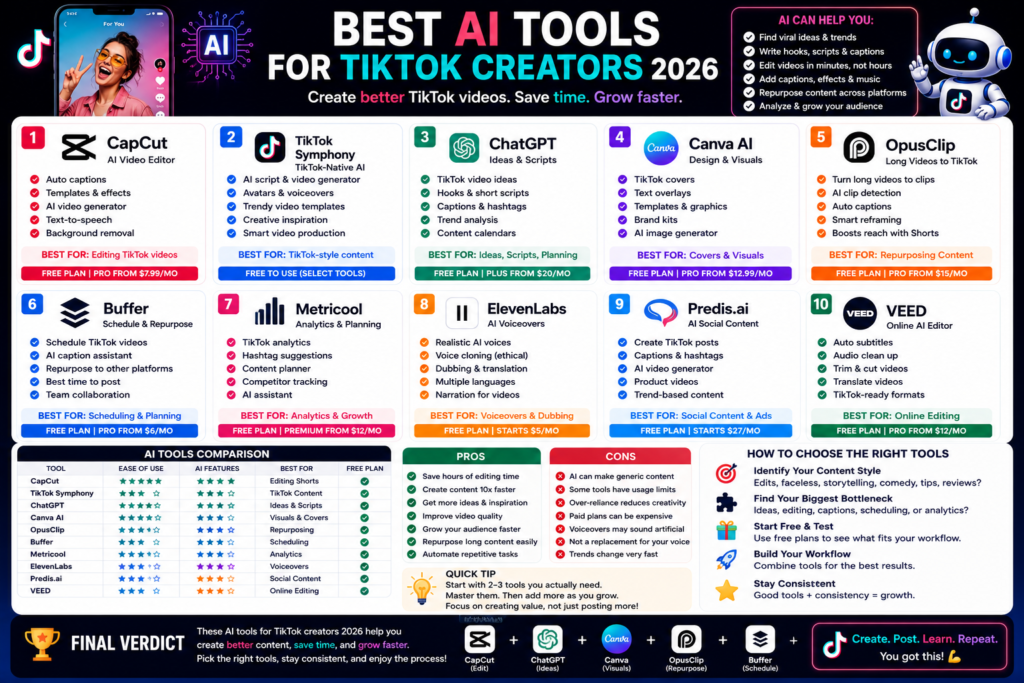
Best AI Tools for TikTok Creators 2026: Create Faster, Edit Smarter, and Grow Your Audience Quick...
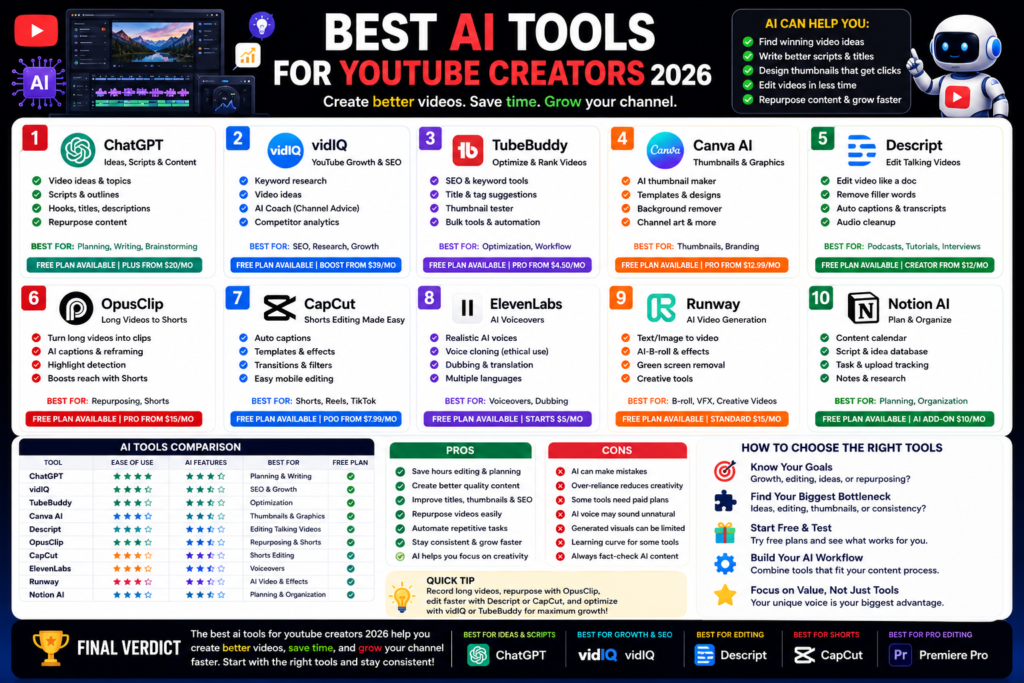
Best AI Tools for YouTube Creators 2026: Grow Faster, Edit Smarter, and Save Time Quick Answer:...
Leave a Comment