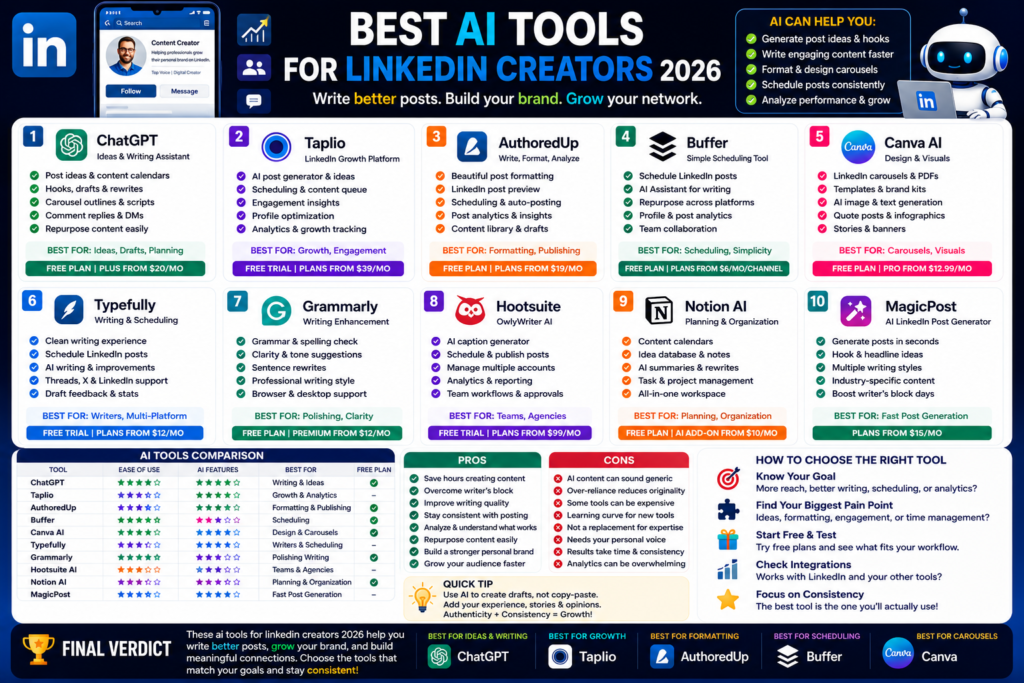
Best AI Tools for LinkedIn Creators 2026
Best AI Tools for LinkedIn Creators 2026: Write Better Posts, Grow Your Brand, and Save Time...
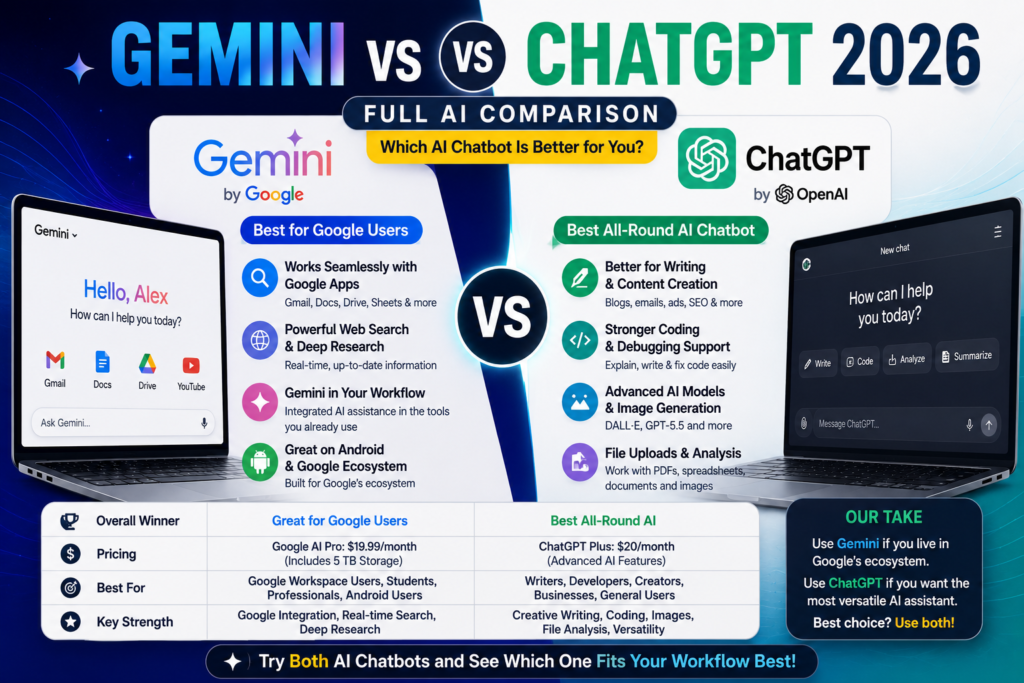
Quick Answer:
ChatGPT is still the better all-round AI chatbot in 2026 for writing, coding, images, file work, and everyday productivity. Gemini is better if you already use Google apps like Gmail, Docs, Drive, YouTube, Android, and Google Search.
Gemini vs ChatGPT 2026 is one of the most important AI comparisons right now.
And honestly, it is not a simple “this one wins everything” situation.
Both tools are powerful. Both can help with writing, research, coding, planning, learning, brainstorming, and productivity. But they feel different.
ChatGPT feels like a complete AI assistant for almost everything. OpenAI describes ChatGPT as a tool to get answers, find inspiration, and be more productive, with GPT-5.5 listed as its frontier model for professional work.
Gemini feels more connected to Google’s world. Google describes Gemini as an AI assistant for writing, planning, brainstorming, and more.
Here is the thing.
If you want one AI chatbot for daily use, ChatGPT is easier to recommend. If your work happens inside Google tools, Gemini can feel more practical.
My simple opinion is this:
Use ChatGPT if you want the best all-round AI chatbot.
Use Gemini if you want an AI tool that works closely with Google apps.
Use both if you write, research, study, or run a business every day.
People compare them because both are major AI tools from huge companies.
ChatGPT is made by OpenAI.
Gemini is made by Google.
They both help with:
But the experience is not the same.
ChatGPT feels more flexible.
Gemini feels more connected.
That is the easiest way to understand the difference.
ChatGPT is still one of the most popular AI tools in the world.
In my experience, it is the easiest AI chatbot to recommend to beginners because it works well for many different tasks.
You can use ChatGPT for writing one minute, coding the next, then image ideas, then business planning, then research summaries.
That flexibility is its biggest strength.
ChatGPT is strong for general productivity.
It works well for:
ChatGPT Plus also includes expanded features like voice conversations, image generation, file uploads and analysis, Deep Research tools where available, and Custom GPT creation and use.
That makes it more than a basic chatbot.
It becomes a real AI productivity tool.
ChatGPT has a free plan and multiple paid options.
OpenAI’s pricing page says the free plan includes limited access to GPT-5.5 Instant, limited messages and uploads, limited image generation, limited Deep Research, limited memory and context, and limited Codex access.
ChatGPT Plus costs $20/month according to OpenAI’s Help Center. It gives enhanced access to ChatGPT features, including image generation, voice, file uploads, Deep Research where available, and Custom GPTs.
Honestly, ChatGPT Plus is worth it if you use AI every day.
If you only ask a few questions per week, the free plan is enough.
ChatGPT feels better when you need one tool for many tasks.
For example, bloggers can use it for article outlines, FAQs, meta descriptions, image prompts, and content updates.
Developers can use it for debugging, code explanations, and small scripts.
Students can use it for study plans, summaries, and simple explanations.
Small business owners can use it for emails, proposals, customer replies, and marketing ideas.
That is why ChatGPT still feels like the best AI chatbot for daily use.
Gemini is Google’s AI assistant.
And its biggest advantage is obvious.
It works inside Google’s ecosystem.
If you already use Gmail, Google Docs, Google Drive, Google Sheets, YouTube, Android, Calendar, and Google Search, Gemini can feel very useful.
Gemini is especially useful for people who already use Google tools.
Google AI Pro includes Gemini in Gmail, Docs, and more, higher access to Google AI, and 5 TB of storage as part of the plan benefits.
That means Gemini is not just a separate chatbot.
It can become part of your existing workflow.
For example, Gemini can help you:
This is where Gemini becomes powerful.
It saves time inside tools people already use.
Gemini also has advanced tools like Deep Research and Canvas.
Google’s Gemini updates mention that Gemini can use tools like Deep Research and Canvas, and can work with apps like Gmail or Calendar when a task requires it.
Deep Research is useful when you want a deeper research-style answer.
Canvas is useful when you want to work on drafts, apps, interactive content, or structured ideas.
The truth is, Gemini is getting better for serious productivity.
It is no longer only a Google Search-style chatbot.
Gemini feels better when your work is already connected to Google.
For example, if you are a student using Google Docs and Drive, Gemini can help you organize notes.
If you are a business owner using Gmail, it can help you write faster replies.
If you are a creator using YouTube, Google Search, and Docs, Gemini can help with content research.
If you use Android, Gemini may also feel more natural in your daily phone workflow.
So, Gemini’s biggest strength is not only the chatbot.
It is the ecosystem around it.
Now let’s compare both tools directly.
| Feature | ChatGPT | Gemini |
|---|---|---|
| Best for beginners | Better | Good |
| Best all-round AI chatbot | Better | Good |
| Writing quality | Very strong | Good |
| Google app integration | Limited | Better |
| Image generation | Strong | Good |
| Research features | Strong | Strong |
| Coding help | Very strong | Good to strong |
| File analysis | Strong | Strong in Google ecosystem |
| Mobile use | Strong | Strong, especially on Android |
| Best paid value | Strong for AI features | Strong if you use Google storage/apps |
| Best for business users | Very strong | Strong for Google Workspace users |
ChatGPT wins for flexibility.
Gemini wins for Google integration.
That is the main story.
For writing, I prefer ChatGPT.
It is better for blog posts, website copy, emails, outlines, product descriptions, and social media content.
Gemini can also write well, but sometimes it feels less natural than ChatGPT or Claude.
That does not mean Gemini is bad.
It just means ChatGPT is usually easier to shape into the tone you want.
For AI Daily Tool-style content, ChatGPT is stronger for structure and flow.
This one is closer.
ChatGPT is very good for research summaries, explanations, and content planning.
Gemini is strong because it is connected to Google’s search and productivity ecosystem. Deep Research also makes Gemini useful for deeper topic exploration.
If I need quick research and explanation, I use ChatGPT.
If I am already working inside Google Docs, Gmail, or Drive, Gemini makes more sense.
ChatGPT is still better for most coding help.
It is strong for debugging, explaining errors, writing functions, reviewing logic, and helping beginners understand code.
Gemini is also improving for coding, especially through Google’s AI plans and developer tools. Google AI Pro includes higher limits in AI Studio, Gemini CLI, and Gemini Code Assist, according to Google’s AI plans page.
But for everyday coding help, ChatGPT still feels stronger and easier to use.
Pricing matters because most users do not want to pay for five AI tools.
They want one or two that actually help.
ChatGPT Free is good for light users.
ChatGPT Plus costs $20/month and includes expanded access to features like voice, image generation, file uploads and analysis, Deep Research tools where available, and Custom GPTs.
I think ChatGPT Plus is best for:
If you use ChatGPT daily, the $20/month plan is easy to justify.
Gemini has a free experience, and Google AI plans unlock more features.
Google AI Pro includes higher access to Google AI, Gemini app features, Gemini in Gmail, Docs, and more, plus 5 TB of storage.
That makes Gemini’s pricing different from ChatGPT.
You are not only paying for an AI chatbot.
You are also paying for Google storage and Google app integration.
So if you already need Google storage, Google AI Pro can be a strong deal.
Here is my honest take.
ChatGPT Plus is better if you mainly want powerful AI features.
Google AI Pro is better if you want AI plus Google storage and Workspace benefits.
So the best value depends on your workflow.
If you write content, code, research, and create images, ChatGPT Plus is better.
If you live in Gmail, Docs, Drive, and Android, Google AI Pro may be better.
No Gemini vs ChatGPT 2026 comparison would be complete without the good and bad sides.
ChatGPT has many strengths.
In my experience, ChatGPT feels like the better tool when you do many different types of work.
ChatGPT also has weaknesses.
Here is the thing.
ChatGPT is powerful, but it is not automatic perfection.
You still need human judgment.
Gemini also has strong benefits.
Gemini’s biggest advantage is convenience.
It works where many people already work.
Gemini is not perfect either.
Gemini is very useful, but it is not the best fit for everyone.
The right choice depends on your daily work.
ChatGPT is best if you want a flexible AI assistant.
Use ChatGPT if you are:
ChatGPT is also better if you want image generation, writing help, file analysis, and coding support in one place.
Gemini is best if your workflow is built around Google.
Use Gemini if you use:
If your emails, files, meetings, and documents already live in Google, Gemini can save time.
That is where it makes the most sense.
Honestly, using both can be smart.
Use ChatGPT for writing, coding, planning, and creative work.
Use Gemini for Google-connected tasks, Gmail, Docs, Drive, and research inside your existing workflow.
You do not need to make AI tools a religion.
Use the right tool for the right task.
Gemini is better if you use Google apps every day. ChatGPT is better as an all-round AI chatbot for writing, coding, image generation, file analysis, and general productivity.
Yes, in my experience, ChatGPT is better for most writing tasks. It is stronger for blog posts, emails, SEO content, product descriptions, and social media captions.
Yes, Gemini is better for Google Workspace users. Google AI Pro includes Gemini in Gmail, Docs, and more, which makes it useful for people already working inside Google apps.
ChatGPT is better for general studying, explanations, writing help, and brainstorming. Gemini is better if the student already uses Google Docs, Drive, and Google tools for schoolwork.
ChatGPT Plus is better if you mainly want AI features. Google AI Pro is better if you want AI features plus Google app integration and cloud storage.
So, who wins in Gemini vs ChatGPT 2026?
My honest answer is this: ChatGPT wins overall, but Gemini wins for Google users.
ChatGPT is the better all-round AI chatbot. It is easier to use for writing, coding, content creation, file analysis, image ideas, studying, and business productivity.
Gemini is the better choice if your daily work already happens inside Google apps. Gmail, Docs, Drive, Android, YouTube, and Workspace make Gemini more useful than a normal chatbot.
So here is my final advice.
Start with ChatGPT if you want one AI assistant for everything.
Try Gemini if you use Google tools every day.
And if you are serious about productivity, test both for one week. You will quickly see which one saves you more time.
For more honest comparisons like this Gemini vs ChatGPT 2026 guide, keep reading AI Daily Tool for simple AI reviews, beginner guides, and practical tool recommendations.
Best AI Tools for LinkedIn Creators 2026: Write Better Posts, Grow Your Brand, and Save Time...
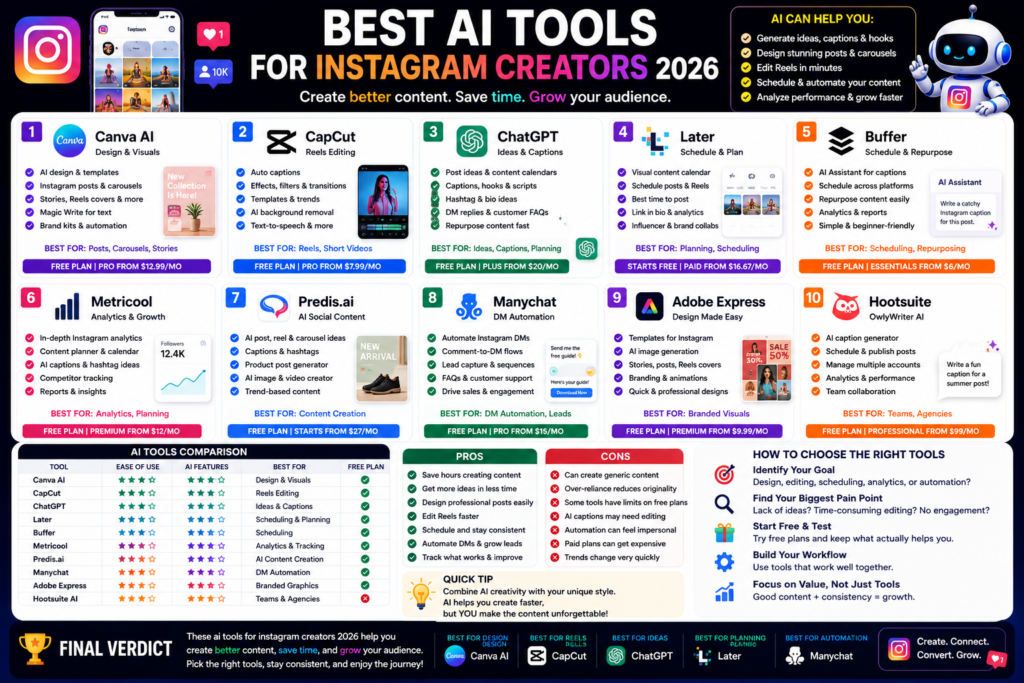
Best AI Tools for Instagram Creators 2026: Create Better Posts, Reels, and Carousels Faster Quick Answer:...
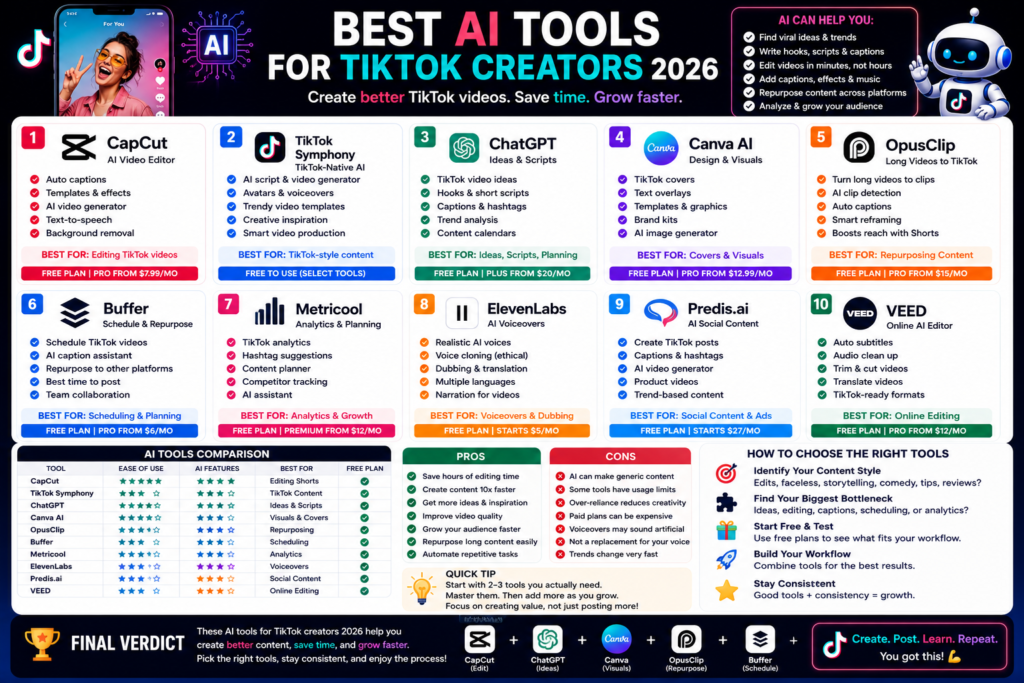
Best AI Tools for TikTok Creators 2026: Create Faster, Edit Smarter, and Grow Your Audience Quick...
Leave a Comment