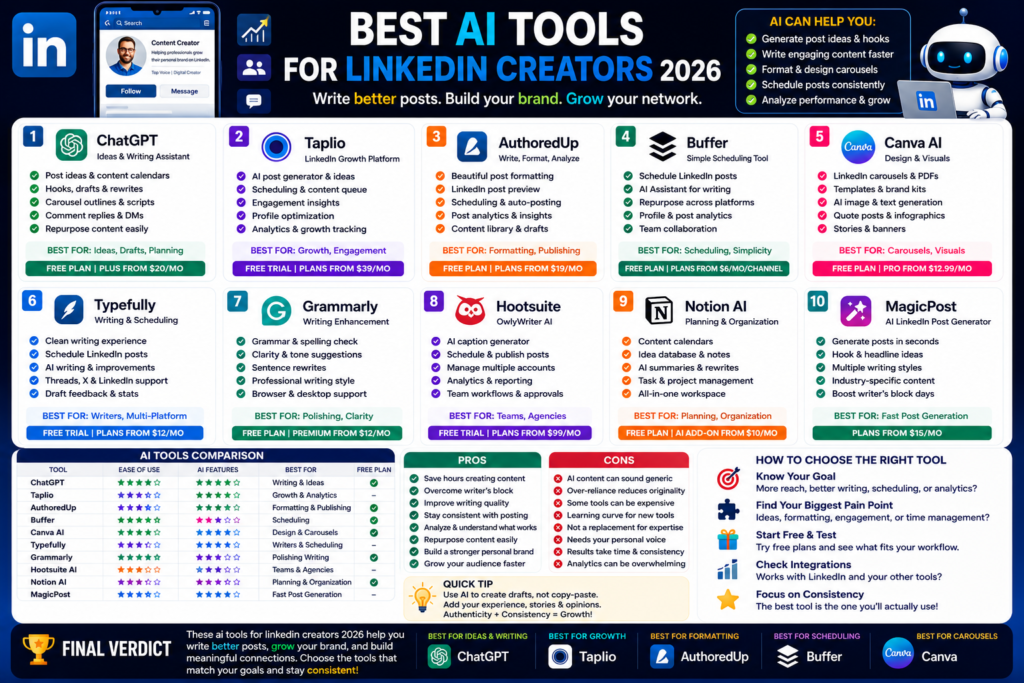
Best AI Tools for LinkedIn Creators 2026
Best AI Tools for LinkedIn Creators 2026: Write Better Posts, Grow Your Brand, and Save Time...

Quick Answer:
Claude AI is one of the best ChatGPT alternatives in 2026, especially for writing, research, coding, long documents, and thoughtful answers. It feels more natural than many AI chatbots, but ChatGPT still wins in some areas like tool variety and broader ecosystem.
Claude AI review 2026 is a topic a lot of people are searching for right now, and honestly, I get why.
ChatGPT is still huge. Gemini is getting better. Perplexity is strong for research. But Claude has built a very loyal audience because it feels different.
In my experience, Claude is one of the most “human-sounding” AI chatbots. It gives calm, clean, well-structured answers. It is especially good when you ask it to write, explain, summarize, or think through a complex topic.
Claude is made by Anthropic. The company describes Claude as an AI for problem solvers that can help users analyze data, write code, think through hard work, and break down complex problems.
Here is the thing. Claude is not perfect. It can still make mistakes. It can still be too careful sometimes. And depending on your location or plan, some features may feel limited.
But if you want an AI writing assistant, AI research tool, or ChatGPT alternative that feels polished and thoughtful, Claude is absolutely worth testing.
Claude AI was created by Anthropic.
Anthropic is one of the biggest AI companies competing with OpenAI, Google, Microsoft, and other major AI players. Claude is its main AI assistant.
The Claude model family includes different models for different needs. Anthropic’s model docs describe Claude as a family of state-of-the-art large language models used for different performance levels and use cases.
That means Claude is not just one model. It is a full AI product family.
Claude can help with many everyday tasks.
You can use Claude for:
The good news is that Claude is very beginner-friendly. You don’t need to understand AI terms. You just type what you need.
For example, you can say, “Rewrite this email in a friendly tone,” or “Summarize this document for a business owner,” and Claude usually gives a clean result.
Claude has a lot of features now. Some are basic. Some are powerful. Some are clearly made for business users and developers.
Let me explain the ones that matter most for normal users.
This is where Claude really shines.
If you write blogs, emails, LinkedIn posts, reports, proposals, or scripts, Claude is very useful. It often sounds less robotic than many AI tools.
In my experience, Claude is better than many chatbots at keeping a natural tone. It does not always overdo the “marketing style” unless you ask for it.
That makes it useful for:
Honestly, if your main goal is writing, Claude should be near the top of your list.
Claude is also strong with long documents.
You can ask it to summarize, compare, rewrite, or explain large pieces of text. This is useful if you work with reports, PDFs, contracts, research notes, meeting transcripts, or content briefs.
The truth is, this is one reason many people call Claude the best ChatGPT alternative for writers and researchers.
It handles context well and often keeps the answer organized.
Claude is not only for writing.
It is also becoming a serious coding assistant.
Anthropic’s Claude Sonnet 4.6 page says Sonnet 4.6 is built for coding, agents, and professional work at scale, with the ability to compress multi-day coding projects into hours.
Claude Opus 4.7 was also released in April 2026 and Anthropic says it improves on Opus 4.6 for advanced software engineering, long-running tasks, instruction following, and verification of outputs.
That does not mean Claude will replace developers. No serious developer should blindly trust AI code.
But it can help you:
For developers, Claude is now a real competitor to ChatGPT and GitHub Copilot.
Claude is becoming more useful for real work, not just chatting.
The Claude free plan currently lists web, iOS, Android, and desktop chat, code and data visualization, writing and editing, web search, memory across conversations, file creation with code execution, desktop extensions, Slack and Google Workspace connections, remote MCP connectors, and extended thinking for complex work.
That is a big feature set for a free AI tool.
Of course, free plans always have limits. But for beginners, Claude gives enough to test the product properly.
Pricing is one of the biggest things people want to know before using any AI tool.
So let’s keep this simple.
Claude has a free plan.
The free plan is best for casual users, beginners, students, and people who want to test Claude before paying.
As mentioned above, the free plan includes chat across web, mobile, and desktop, plus useful features like web search, memory, file/code features, and integrations listed on Claude’s pricing page.
This is honestly generous for light users.
But the free plan is not ideal if you use AI all day. You may hit usage limits, and you may not always get access to the strongest models or highest limits.
Claude Pro is the plan most individual power users will consider.
Claude’s pricing page lists Pro at $20/month if billed monthly, or $17/month with annual billing at $200 upfront. Pro includes more usage, Claude Code, Claude Cowork, unlimited projects, Research, access to more Claude models, Claude for Microsoft 365, and Claude for Microsoft Outlook.
I think Claude Pro makes sense if you use AI every day.
For example, if you write content, code, work with documents, or use AI for business tasks, Pro can easily save more than $20 worth of time each month.
But if you only ask a few questions a week, the free plan is enough.
Claude Max starts from $100/month and gives 5x or 20x more usage than Pro, higher output limits, early access to advanced Claude features, and priority access during high-traffic times.
Most normal users do not need Max.
Claude Team is for teams of 5 to 150 people. Claude lists standard seats at $20 per seat/month annually or $25 monthly, while premium seats are $100 per seat/month annually or $125 monthly. Team includes admin controls, enterprise search, SSO, connector controls, Microsoft 365 and Slack connections, and no model training on your content by default.
Enterprise is for larger companies that need stronger controls like audit logs, SCIM, custom data retention, network-level access controls, and HIPAA-ready options.
For most readers, Free or Pro is the best place to start.
Now let’s talk about the real question.
Is Claude better than ChatGPT?
Honestly, it depends on what you need.
Claude feels better for long writing, careful explanations, and natural tone.
ChatGPT often feels better as an all-round tool because it has a larger ecosystem, strong image tools, custom GPTs, broad integrations, and more mainstream adoption.
Here is my simple opinion:
Use Claude if you care most about writing quality, long documents, and clean reasoning.
Use ChatGPT if you want one AI tool that does almost everything and has more features in one place.
Gemini is strong if you use Google products a lot.
If your life is inside Gmail, Docs, Drive, YouTube, and Google Search, Gemini can be useful.
But for pure writing and document-style answers, I still prefer Claude in many cases.
Claude usually feels more polished and less rushed.
Perplexity is better for search-style research.
It gives sources clearly and works more like an AI search engine.
Claude is better when you want deeper writing, cleaner summaries, or help thinking through a topic.
So the choice is simple.
Use Perplexity for source-heavy research. Use Claude for writing, reasoning, and document work.
| Tool | Best For | Free Plan | Paid Plan Value | Main Weakness |
|---|---|---|---|---|
| Claude AI | Writing, research, documents, coding | Yes | Strong | Can feel too careful sometimes |
| ChatGPT | All-round AI tasks | Yes | Very strong | Can sound generic without good prompts |
| Gemini | Google users and Workspace tasks | Yes | Good | Writing quality can vary |
| Perplexity AI | Research with sources | Yes | Good | Less creative for long-form writing |
| Microsoft Copilot | Microsoft Office users | Yes | Good for work users | Best inside Microsoft ecosystem |
The truth is, Claude is not trying to be the loudest AI tool. It feels more focused.
That is why many writers, researchers, and professionals like it.
No Claude AI review 2026 would be complete without the good and bad sides.
Claude has a lot going for it.
In my experience, Claude’s biggest strength is tone. It often gives answers that feel less robotic.
Claude is not perfect.
Here is the thing. These are not deal-breakers for most people.
But they matter if you need heavy daily use, advanced integrations, or very specific workflows.
Claude is useful for many people, but it is especially strong for certain users.
Claude is excellent for bloggers.
You can use it for outlines, intros, title ideas, FAQs, content updates, summaries, and rewriting rough drafts.
For SEO content, Claude can help you create clear article structure. But you should still do keyword research properly and add your own examples.
I would not publish Claude’s first draft without editing. But as a writing partner, it is very good.
Claude is also useful for students.
It can explain hard topics, summarize notes, create study plans, and turn confusing text into simple language.
Researchers can use it to compare ideas, organize notes, and simplify long documents.
Again, don’t blindly trust it. Check important facts. But for learning and understanding, Claude is helpful.
Freelancers can use Claude for proposals, client messages, project plans, social media posts, and email replies.
Small business owners can use it for customer service drafts, marketing ideas, SOPs, product descriptions, and basic business planning.
If you run a small business and write a lot every week, Claude Pro can be worth it.
Developers should also test Claude.
It is useful for debugging, planning code, writing documentation, reviewing logic, and explaining complex code.
Claude Opus and Sonnet models have become especially important for coding and professional work in 2026. Anthropic’s system card page shows recent Claude model releases including Opus 4.7 in April 2026 and Sonnet 4.6 in February 2026.
That makes Claude a serious option for developers who want an AI coding assistant.
Yes, Claude AI is worth it in 2026 if you need help with writing, research, coding, summaries, documents, and business tasks. It is one of the best ChatGPT alternatives right now.
Yes, Claude has a free plan. It includes chat on web, mobile, and desktop, along with several useful features like web search, memory, file/code features, and integrations listed by Claude.
Claude Pro costs $20/month when billed monthly or $17/month with annual billing at $200 upfront. It includes more usage, Claude Code, Claude Cowork, Research, unlimited projects, and access to more Claude models.
Claude is better for some things, especially natural writing, long documents, and thoughtful explanations. ChatGPT is better as a general all-round AI tool with a bigger ecosystem. The best choice depends on how you work.
Yes, Claude can write blog posts, outlines, introductions, FAQs, and content briefs. But you should still edit the content, add personal examples, check facts, and optimize it for SEO before publishing.
So, what is my honest take after this Claude AI review 2026?
Claude is absolutely worth trying.
It may not replace ChatGPT for everyone, but it is one of the strongest AI chatbots available today. For writing, long documents, research support, and careful explanations, Claude feels excellent.
The free plan is good for testing. Claude Pro is better if you use AI daily. Max and Team plans are more for heavy users, developers, and businesses.
If you’re a blogger, freelancer, student, marketer, small business owner, or developer, Claude deserves a place in your AI toolkit.
My advice is simple. Try Claude for one week. Use it for real tasks, not just random questions. Ask it to rewrite emails, summarize documents, plan content, explain ideas, and review your work.
That is the best way to know if it fits your workflow.
And if you want more honest reviews like this Claude AI review 2026, keep reading AI Daily Tool for simple AI tool comparisons, beginner guides, and practical recommendations.
Best AI Tools for LinkedIn Creators 2026: Write Better Posts, Grow Your Brand, and Save Time...
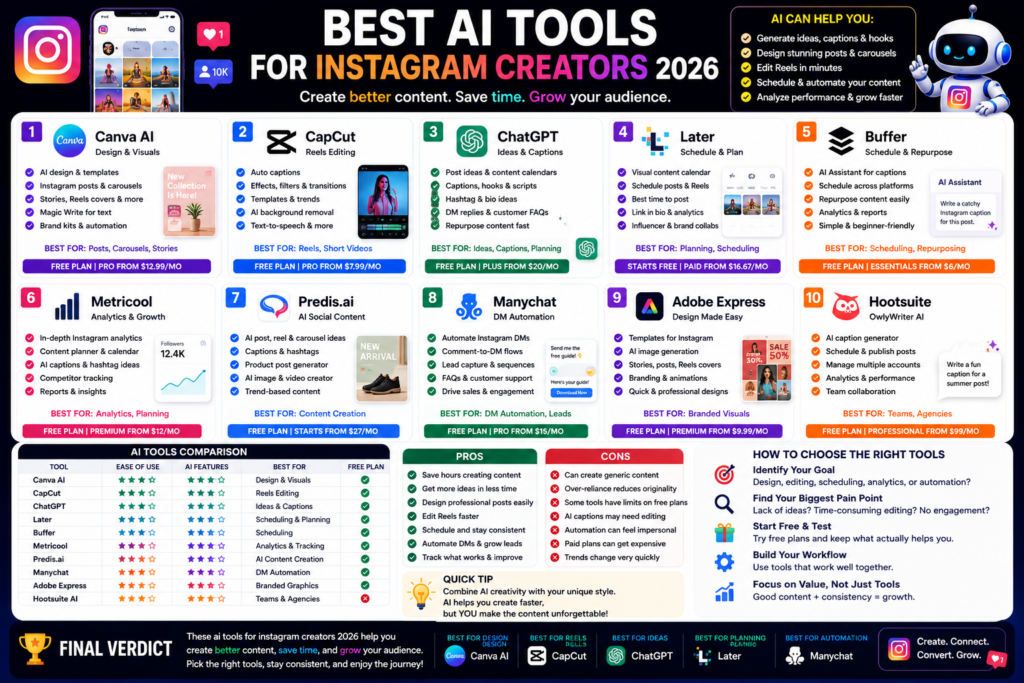
Best AI Tools for Instagram Creators 2026: Create Better Posts, Reels, and Carousels Faster Quick Answer:...
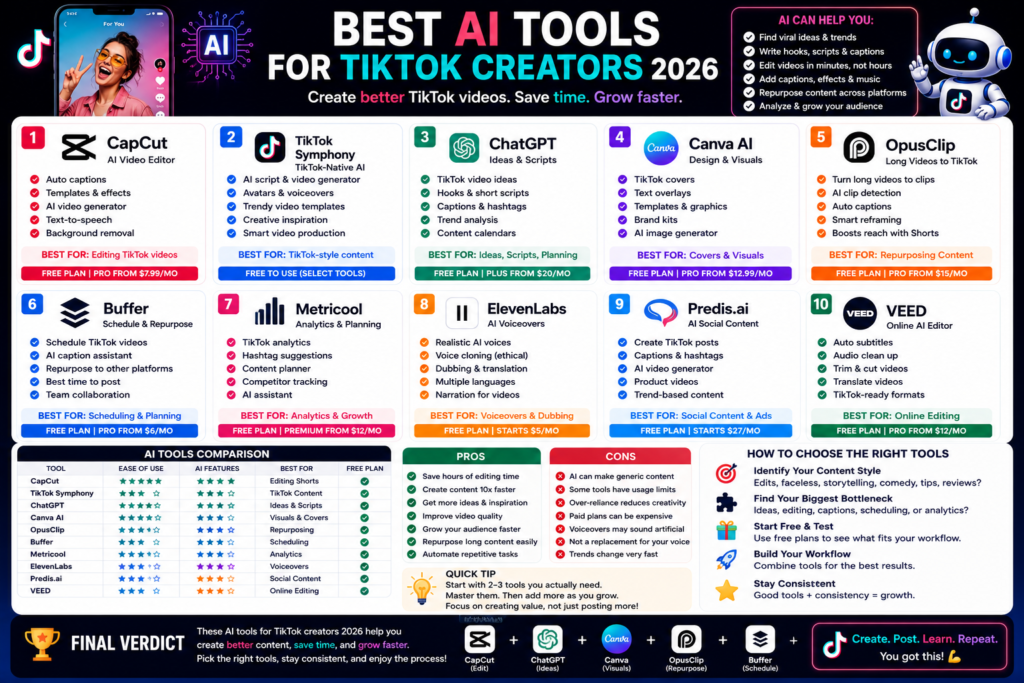
Best AI Tools for TikTok Creators 2026: Create Faster, Edit Smarter, and Grow Your Audience Quick...
Leave a Comment